Click the Button Controls and Comfort
How you actually click, how you save, and which display bugs belong to the Demo versus a Deck guess.
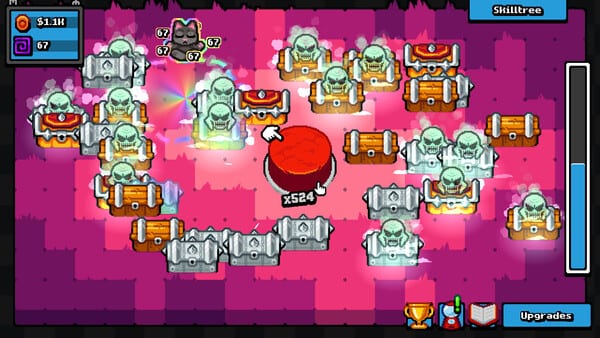
The intended input is a click
Click the Button is a mouse-first incremental. The joke and the verb are the same: you click the button. Chests open, upgrades buy, gacha rolls (in the full game) happen because a pointer or a key confirmed an action. There is no timed input requirement. No rhythm window, no QTE bar, no “press in 0.3 seconds or the chest explodes.” You can play slowly. You can play in short bursts. The 70–120 minute 100% window is about systems and stacks, not about a reaction test.
Steam lists keyboard among the ways to play. That is the keyboard-only option in the store categories: you are not required to own a gaming mouse to complete the campaign. Keyboard-only still means discrete presses, not a held turbo key from a third-party macro. If a key repeats faster than a human, you have left “keyboard-only” and entered the same danger zone as an autoclicker. Autoclickers can crash this Godot build. Measure human speed on the CPS test if you are curious. Do not install a clicker to “win” a two-hour game.
No controller support has been announced. Do not expect a radial menu, gyro click, or Steam Input profile from LoopCap until they say so. If a community layout exists, it is unofficial. Bindings that spam click are still autoclickers wearing a gamepad hat.
Camera comfort and volume
This is a single-player desktop clicker, not a first-person shooter. Camera comfort still matters because particle pops, screen motion, and a giant button in the middle of the frame can fatigue you over an hour. Sit at a normal monitor distance. If the game exposes shake, motion, or zoom-style toggles, use them until the picture feels boring in a good way. This page will not invent a settings label LoopCap has not documented. If a toggle exists in your build, it will be in the menu, not in a hidden console.
Custom volume is part of the shipped options. Clicker audio is repetitive by design. Turn effects down if you are playing in a shared room; turn them up if you rely on rarity stingers so you can look away from the screen. There is no competitive ear advantage. Comfort wins.
Take breaks. Hands on Fire! is 10,000 clicks, and Born Collector! wants 1,000 of each item. That is a lot of presses in a compact campaign. Fatigue is a control problem as much as a content problem. Stretch. Switch hands if you can. The game will wait. Nothing despawns on a timer.
Save anytime, locally
You can save anytime in the sense that the campaign is not a locked raid wipe: close the game when you need to. Steam Cloud is not listed on the store. Treat the save as a local file on that Windows install. Copying the PC to another machine is a manual job. There are no promo codes to restore progress. If you delete the save, Steam achievements on the account may remain while the in-game collection does not.
Do not prestige or rebirth on your only copy of a near-100% save unless you have read the in-game warning. Demo players already learned that rebirth after many chests could crash. See rebirth and troubleshooting.
Fullscreen Demo bug: 1280×720 in the corner
Demo players (app 4805850) reported a fullscreen failure where the game image sits at 1280×720 in the corner instead of filling the monitor. It looks like a windowed render pasted onto a black fullscreen swap. That is a display bug, not a puzzle. Play windowed if you need a stable picture. The paid app (3946950) is the build that added gacha, new upgrades, new items, a larger skill tree, and extra button/background visuals; display bugs can still exist, but the Demo corner-window is the report with a specific resolution attached.
A related 1920×1080 fullscreen issue and a player-side Attributes.tres workaround show up in Steam discussions. Those notes belong in troubleshooting, described as a local display workaround, not as an exploit. Do not download random “fixed Attributes.tres” files from strangers.
Hardware context lives on system requirements: Windows, ~300 MB, a light Godot title. If the picture is wrong and the machine is fine, it is likely the fullscreen path, not a missing GPU.
Steam Deck: no official answer
Steam Deck compatibility is not officially confirmed in the materials this wiki trusts. Community Proton/Deck reports can appear later; they are not a LoopCap badge. Until the store says Verified, treat Deck as unknown: maybe it clicks fine with the trackpads, maybe fullscreen inherits the 1280×720 corner bug, maybe a community layout maps a trigger to click and then crashes like an autoclicker. Buy with that uncertainty if Deck is your only PC.
If you try Deck anyway, start windowed, disable any turbo-click layer, and keep a Windows save backup. Cloud will not help you.
Practical binding advice without fake key names
Use the mouse button you actually like for the main click. Use the keyboard path Steam advertises if a mouse is painful. Do not bind a hardware macro. Do not leave the gacha UI open while you walk away; it pauses the sim, which wastes the hour you reserved for 100%.
If clicks register twice, check mouse debounce in Windows, not a secret game slider. If clicks do not register, click the actual button art, not the empty margin, and make sure an overlay (Steam, Discord, GPU) is not eating the first press.
Controls in Click the Button are supposed to disappear. When they become the whole conversation, something is wrong: a crashy clicker, a cornered 1280×720 fullscreen, or a Deck guess presented as a promise. Fix the first two. Leave the third unlabeled until LoopCap or Valve labels it.
Frequently Asked Questions
Quick answers to common questions about the game.
Can I play entirely on a keyboard?
Steam lists keyboard as an input option. You still press for each click. Do not use a turbo macro; autoclickers can crash the game.
Is there official controller or Steam Deck support?
No controller support has been announced. Steam Deck is not officially confirmed here. Treat both as unknown until LoopCap or the Steam page says otherwise.
Does the game have timed button prompts?
No. You can click at your own pace. Completion time is about collections and stacks, not reaction skill.
Why is fullscreen stuck as a small 1280×720 picture in the corner?
That is a reported Demo fullscreen bug. Play windowed for a usable image. See Troubleshooting for the related 1920×1080 notes.
Does Steam Cloud save my run?
Steam Cloud is not listed. Saves are local. Copy files yourself if you need a backup.